More than 70% of growing businesses say they lose sales because customer data is scattered.
That’s why CRM software exists. In this guide, you’ll learn what a CRM system is, how it works in business, and why even small teams rely on a simple CRM tool to stay organized.
Key Takeaways
- CRM stands for Customer Relationship Management and keeps all customer data and communication in one system.
- It helps teams manage leads, deals, and follow-ups more efficiently.
- CRM connects sales, marketing, and support teams, creating a consistent customer experience.
- Reports and analytics provide insights for better, data-driven decisions.
CRM Meaning & Core Definition
CRM means Customer Relationship Management.
It’s a way for a business to keep customer information, communication, and sales activity in one place, so nothing important gets lost.
When someone calls, you already know who they are, what you discussed last time, and what should happen next.
What Does CRM Stand For?
CRM represents continuity in customer communication. You don’t start from zero every time you talk to a client. You continue where the last conversation ended.
CRM Strategy vs CRM Software
You understand the concept of CRM. Next step: Strategy.
CRM strategy defines how a business thinks about relationships, priorities, and long-term value. It influences who gets attention, when follow-ups happen, and how success is measured.
CRM software supports this approach by turning decisions into daily routines that the whole team can follow.
Wondering why this matters? Let’s dive in.
Why CRM Matters Today
Do you answer customer emails from your inbox, track deals in spreadsheets, and rely on memory for follow-ups? That works for a while. Until it doesn’t.
As customer numbers grow, CRM helps you keep control, respond on time, and deliver a professional experience without adding stress. This is why more businesses adopt CRM earlier than ever before.
Today around 91% of companies with more than 10 employees use a CRM system to manage customer interactions and support growth, showing just how essential these tools have become.
How CRM Systems Work in 5 Points
Point 1: Centralized Customer Data
Where do you look when a customer calls?
A CRM gives you one shared view that brings together contacts, communication, and activity so you don’t need to switch between tools.
Everything important is available the moment you need it.
Point 2: Sales & Marketing Automation
Sales and marketing only work well when they move in the same direction. CRM automation connects lead generation, follow-ups, and deal management into one continuous flow.
Instead of manually moving leads between tools, the system helps ensure that every contact gets the right attention at the right time.
Point 3: Customer Support Integration
As customer numbers increase, support teams face higher pressure. CRM integration helps maintain service quality by connecting support activity with customer history and ongoing work across the business. This reduces repeated explanations and shortens resolution time.
Point 4: Reporting, Analytics & Insights
CRM reporting brings structure into daily decision-making. Instead of relying on assumptions, businesses can track sales progress, pipeline health, and customer activity in real time.
Analytics help identify what moves deals forward and where attention is needed, while insights support more confident planning.
Point 5: Integration with Other Business Tools
CRM rarely works alone in modern business environments. In daily business, customer communication, invoicing, projects, and internal processes all play a role.
When CRM connects with email, accounting, ERP, or support tools, work becomes smoother and more predictable.
Instead of copying data between systems, information flows automatically. Teams stay aligned, errors decrease, and customers experience a more consistent service as the business grows.
TOP 6 Key Features of CRM Software
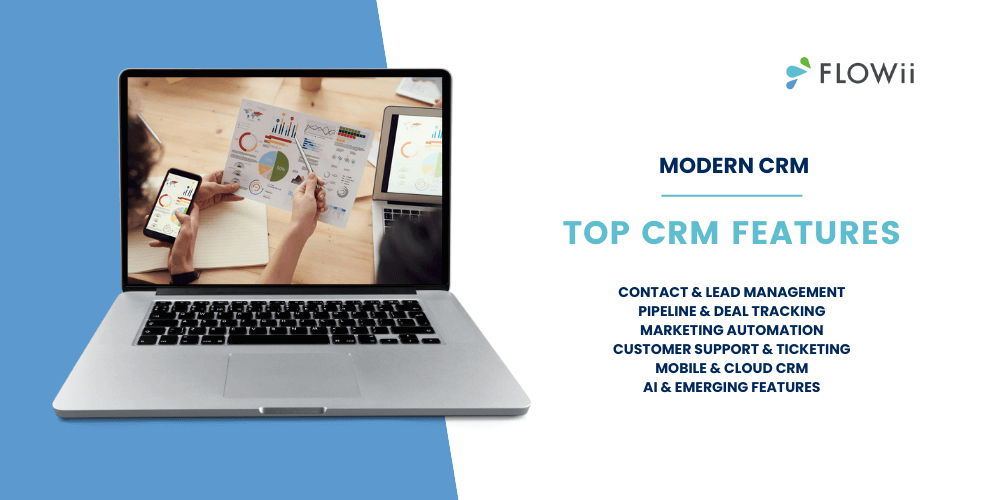
Below are the core features you’ll find in modern CRM software. Each one supports a different part of daily customer work and together they create a complete picture of sales, marketing, and service.
1. Contact & Lead Management
Helps businesses keep customers and lead information structured and usable.
- Tracks interaction history including calls, emails, meetings, and notes
- Shows lead status and readiness to move forward
- Helps teams avoid duplicated or outdated records
2. Pipeline & Deal Tracking
Gives visibility into sales progress and future opportunities.
- Visual sales pipeline showing deal stages
- Clear overview of open, won, and lost deals
- Revenue forecasting based on pipeline data
- Helps sales teams prioritize the right opportunities
3. Marketing Automation
Supports consistent communication without manual effort.
- Email campaigns and follow-up workflows
- Contact segmentation based on behavior or status
- Automated lead nurturing from first interest onward
- Better alignment between marketing and sales activity
4. Customer Support & Ticketing
Connects service activity with customer relationships.
- Case and ticket management in one system
- Multi-channel support such as email or forms
- Clear ownership and response tracking
- Service history connected to customer records
5. Mobile & Cloud CRM
Makes CRM accessible wherever work happens.
- Cloud-based access without local installation
- Mobile access for sales and service teams on the go
- Real-time updates across devices
- Supports flexible and remote work
6. AI & Emerging Features
Adds smarter support to everyday CRM work.
- Predictive insights for sales and customer behavior
- Automated suggestions for next steps
- Personalization based on activity patterns
- Helps teams work faster and with better focus
Benefits of Using a CRM
CRM benefits show up in everyday work, not in theory. Less confusion, clearer priorities, and better follow-ups change how teams work with customers.
Over time, these small improvements add up to stronger relationships and better results.
- Better sales visibility and revenue forecasting
- Centralized data for personalized customer communication
- Stronger team collaboration across departments
- Improved customer retention and loyalty
- Data-driven decisions with real-time insights
Examples of CRM in Business
CRM looks different depending on company size. The goal stays the same, but the way CRM adds value changes as the business grows.
-
Small Businesses
For small businesses, CRM often replaces spreadsheets, notes, and memory.
A small service company uses personal CRM to track leads, schedule follow-ups, and keep an overview of active customers. One person handles sales, support, and invoicing, and CRM helps keep everything under control without extra tools.
The result is fewer missed opportunities and a more professional customer experience, even with a small team.
If you’re looking for small business software that can help you scale smarter, this guide is a great place to start.
-
Mid-Size Companies
Mid-size companies use CRM to align teams and manage higher volumes.
A growing sales team works with CRM pipelines to track deals, forecast revenue, and assign responsibilities. Marketing uses the same CRM to manage campaigns and hand over qualified leads to sales, while support sees customer history when handling requests.
CRM becomes the central workspace that keeps teams aligned and work predictable.
-
Enterprise Organizations
In large organizations, CRM supports structure, scale, and consistency.
Multiple departments work with shared customer data, standardized processes, and detailed reporting. CRM integrates with ERP, finance, and support systems to provide a full view of customer activity across regions and teams.
At this level, CRM helps manage complexity and maintain consistent customer experience at scale.
| Business Size | Typical CRM Use | How CRM Adds Value | Real Impact |
| Small Businesses | Managing contacts, leads, follow-ups | Replaces spreadsheets and notes, keeps daily work under control | Fewer missed leads, clearer priorities, more professional communication |
| Mid-Size Companies | Sales pipeline, team coordination, reporting | Aligns sales, marketing, and support in one workflow | Better forecasting, faster handovers, consistent customer experience |
| Enterprise Organizations | Cross-department processes, integrations, analytics | Connects CRM with ERP, finance, and service systems | Scalable operations, unified customer view, controlled complexity |
CRM by Business Industry
CRM creates the most value when it supports real workflows inside each team.
Sales, marketing, and customer support use the same system, but in very different ways.
Nonprofit teams use CRM to manage donors, track fundraising activities, and build long-term relationships with supporters.
- CRM for Sales Teams
Sales teams use CRM to stay focused, consistent, and predictable.
- Managing leads from first contact to closed deal
- Tracking deal stages, values, and probabilities
- Scheduling follow-ups and reminders
- Keeping notes from calls, meetings, and emails
- Forecasting revenue based on pipeline data
Typical workflow:
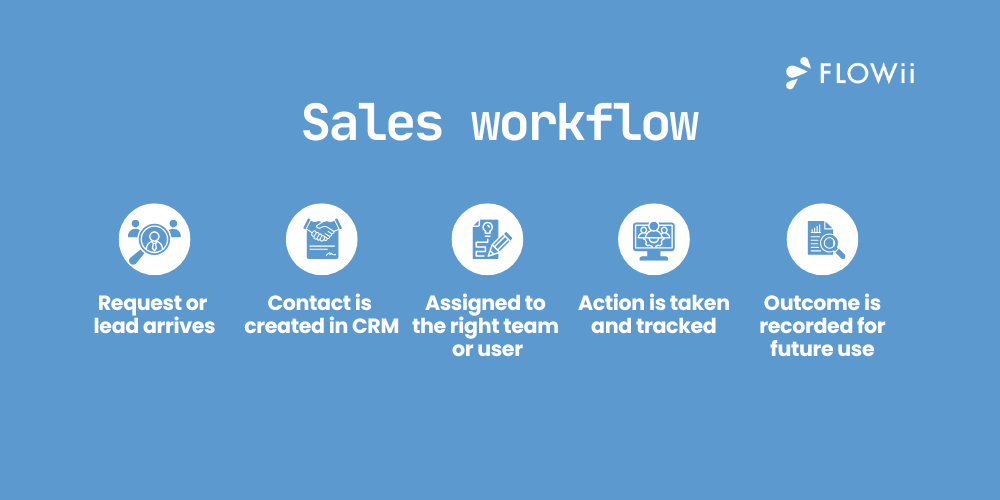
A lead comes in → assigned to a salesperson → moved through pipeline stages → followed up → closed or lost with a clear reason.
- CRM for Marketing Teams
Marketing teams use CRM to turn interest into qualified opportunities.
- Segmenting contacts based on behavior or profile
- Running email campaigns and automated workflows
- Tracking which campaigns generate leads
- Handing over qualified leads to sales
- Measuring campaign performance over time
Typical workflow:
Campaign attracts contacts → contacts are segmented → automated communication runs → engaged leads are passed to sales with full context.
- CRM for Customer Support Teams
Support teams use CRM to deliver fast and consistent service.
- Managing support cases and tickets
- Viewing customer history before responding
- Tracking response times and resolution status
- Coordinating with sales or account managers
- Building long-term service history
Typical workflow:
Request arrives → ticket is created → assigned to support → resolved with full customer context → activity stored for future reference.
Different Types of CRM
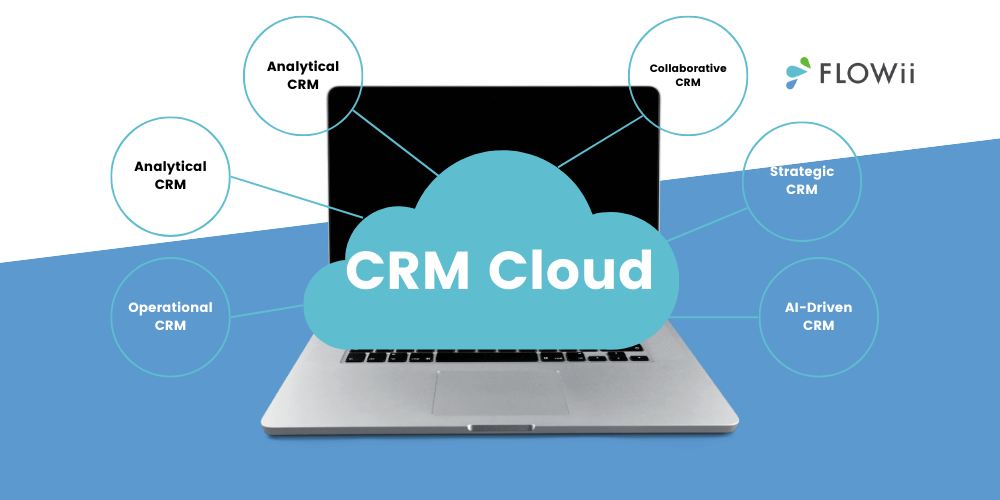
Not every CRM works the same way. Different businesses focus on different needs, and CRM types reflect that. Some support daily work. Others help with planning, insight, or coordination across teams.
Let’s break them down in a simple way.
-
Operational CRM
This is the most common type of CRM. It supports everyday work in sales, marketing, and customer service.
Operational CRM helps automate routine tasks like lead handling, follow-ups, deal updates, and service requests. Sales teams move deals through pipelines. Marketing teams run campaigns and hand over leads. Support teams manage cases without losing context.
If your goal is to work faster and more consistently, this is usually where you start.
-
Analytical CRM
Analytical CRM focuses on data and insight. It looks at what already happened and helps explain why. Reports, dashboards, and trends show how customers behave, how sales perform, and where opportunities or risks appear. This type of CRM helps businesses understand patterns and plan next steps with more confidence. Less guessing. More informed decisions.
-
Collaborative CRM
Customers rarely interact with just one team. Sales talks to them. Support helps them. Marketing follows up. Collaborative CRM makes sure these interactions are shared across departments. Information flows between teams so everyone works with the same understanding of the customer.
The result is smoother handovers and a more consistent experience.
-
Strategic CRM
Strategic CRM looks beyond daily tasks. It focuses on long-term relationships and customer value.
This type of CRM supports planning, segmentation, and prioritization of key customers. It helps businesses decide where to invest time and effort to build loyalty and sustainable growth.
Think long-term. Act with purpose.
-
AI-Driven CRM
AI-driven CRM adds intelligence to the system. It supports teams by learning from data and activity.
Predictive insights suggest next steps, automation reduces manual work, and personalization improves communication. Instead of reacting, teams get support before problems appear.
This is where CRM is heading. Faster. Smarter. More supportive.
CRM vs Other Tools
Many business tools sound similar on the surface. In practice, each one solves a different problem. Understanding the difference helps you choose the right tool for the right job.
CRM vs ERP
CRM and ERP often work together, but they serve different purposes. CRM focuses on customers, relationships, and communication. It supports sales, marketing, and support teams in their daily work with leads and clients. ERP focuses on operations and finance. It manages orders, invoicing, inventory, accounting, and internal processes.
Use case:
Use CRM to manage opportunities and customer communication. Use an ERP system to process orders, invoices, and internal workflows after the deal is closed.
CRM vs CDP (Customer Data Platform)
CRM and CDP both work with customer data, but they answer different questions. CRM is built for teams that actively work with customers. It tracks interactions, deals, tasks, and service activity in real time. CDP collects and unifies large volumes of customer data, often from many sources. It’s mainly used for advanced analytics, segmentation, and marketing insights.
Use case:
CRM helps teams act and follow up.
CDP helps teams analyze and understand large-scale behavior.
CRM vs Marketing Automation Tools
CRM and marketing automation tools are closely connected, but not the same. CRM manages relationships across the entire customer journey. It supports sales pipelines, account management, and service history. Marketing automation tools focus mainly on campaigns and communication. They handle emails, segmentation, and automated journeys, often before sales engagement.
Use case:
Marketing automation attracts and nurtures interest.
CRM takes over when relationships need structure, ownership, and long-term management.
How To Choose A CRM?
The right CRM should fit your business, not the other way around. Before comparing tools, it’s important to know what you actually need.
-
Assess Your Business Needs
Start with your daily reality. How do you manage leads, customers, and follow-ups today, and where do things break down as volume grows?
CRM should solve real problems, not create new ones.
-
Key Features to Look For
Focus on features that support daily work, not just impressive demos. Contact management, pipeline tracking, reminders, and reporting usually matter more than advanced extras.
A good CRM should help you see who your customers are, what’s happening with each deal, and what needs attention today. Clear task management and simple automation reduce manual work and help teams stay consistent.
Look for features that connect naturally. Sales activities, communication, and follow-ups should work together without switching between tools. Reporting should give you answers quickly, not create more questions.
In many cases, a simpler CRM that fits your workflows delivers more value than a complex system that stays unused.
-
Scalability & Integrations
Your CRM should grow with your business, not slow it down. What works for a small team today should still work as customer volume and workload increase.
Scalability means handling more leads and data without losing clarity. Integrations with email, invoicing, accounting, or ERP tools help keep work connected and reduce manual effort. When systems work together, teams stay focused on customers instead of administration.
-
Budget & Cost Considerations
The cheapest CRM is not always the most affordable one.
If a system is hard to use or doesn’t fit your workflows, hidden costs appear in lost time and low adoption.
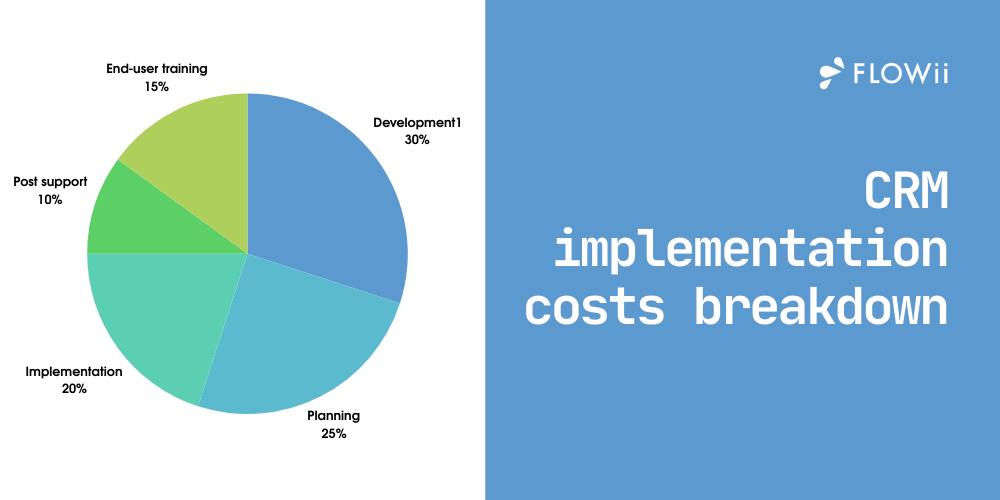
When comparing CRM pricing, look beyond the monthly fee. Setup, training, and future changes all affect total cost. For small and growing businesses, transparent pricing and relevant features often bring better long-term value. Tools like FLOWii follow this approach by offering clarity without unnecessary complexity
-
User Adoption & Support
Support matters, especially in the early stages. Clear guidance, accessible help, and good documentation reduce frustration and speed up adoption.
When teams know where to get answers and feel supported, they use the CRM with more confidence. This leads to better data quality, more consistent workflows, and faster return on investment. Choosing a CRM with reliable support can make the difference between long-term success and early abandonment.
Conclusion
Better customer relationships come from clear processes and shared visibility. The right solution helps teams move faster without chaos.
Try FLOWii free for 30 days and see the difference.
Frequently Asked Questions (FAQ)
What is CRM software?
CRM software helps businesses manage customer relationships, sales activities, and communication in one system. It supports daily work with leads, customers, and follow-ups.
What is CRM in marketing?
CRM in marketing connects campaigns with real outcomes. It shows which activities generate interest and which leads are ready for sales.
What is CRM system proficiency?
CRM system proficiency means knowing how to use CRM effectively in daily work, not just having access to it.
What is CRM data?
CRM data includes contact details, communication history, sales activity, and customer-related notes.
How to use a CRM?
Start by storing contacts and basic customer information in the CRM. Then track communication such as emails, calls, and meetings so every interaction has context.
As you get comfortable, add sales pipelines, tasks, and reminders to manage follow-ups and next steps. Over time, use reports and dashboards to understand what’s working and where improvements are needed. Consistent daily use brings the most value.
What is CRM integration?
CRM integration allows data to flow automatically between CRM and other business tools. This reduces manual data entry and keeps information consistent across systems.
What is CRM automation?
It handles routine tasks like follow-up reminders, lead assignment, and status updates automatically.
By reducing repetitive actions, automation frees up time for real customer communication and helps ensure that no important step is missed as workload increases.
What is CRM project management?
CRM project management is useful for businesses that deliver services after a sale. It connects customer information with tasks, timelines, and responsibilities in one place.
This helps teams manage ongoing work, keep clients informed, and maintain clear ownership from project start to completion. The result is better coordination and smoother delivery.
The best project management software combines CRM, tasks, and reporting in one system, so teams can manage projects and customer relationships without switching between tools.
How to implement CRM?
Start small with your CRM implementation and focus on clear, measurable goals. Define what you want to improve first, such as follow-ups, visibility, or team coordination.
Prepare your data before importing anything. Clean contact lists and decide what information truly matters. Introduce the system step by step, beginning with core workflows, and involve users early so habits form naturally. Training and clear ownership help ensure long-term success.
Do small businesses need CRM?
Even small teams benefit from better structure and follow-ups.
As the number of clients grows, it becomes harder to rely on memory, notes, or spreadsheets.
A shared system helps keep communication consistent, responsibilities clear, and opportunities visible. This allows small businesses to work more professionally without adding unnecessary complexity.
What industries benefit most from CRM?
Industries that depend on regular client communication and long-term relationships gain the most value. This includes:
- IT services,
- consulting,
- real estate,
- manufacturing,
- financial services,
- professional service companies.
Any business that manages leads, ongoing cooperation, or repeat customers benefits from better visibility, coordination, and follow-ups. The more interaction with clients, the greater the impact.