
You can invest in the right tools, but without understanding their purpose, they rarely deliver real value. ERP and CRM are often mentioned together, but they solve very different challenges inside a company.
In this article, you’ll learn the difference between ERP and CRM, when each makes sense, and how to choose the best fit for your needs.
Key Takeaways
- ERP gives leaders control over execution, while CRM gives teams clarity over customers, opportunities, and communication.
- The real decision is not ERP vs CRM, but where your company loses control first: inside daily work or inside customer relationships.
- The strongest setup connects sales with delivery.
ERP and CRM Explained
Let’s break it down by first looking at what ERP and CRM mean and what each one helps you manage.
1. ERP Meaning
ERP, or Enterprise Resource Planning, is a platform that helps companies manage their core internal work from one place.
It connects areas such as finance, invoicing, inventory, orders, resources, and daily operations, so teams can work with accurate information instead of scattered files and disconnected tools. The value of ERP is simple: it gives you better control over how your company runs, helps reduce manual work, and makes it easier to plan, report, and scale with confidence.
Today, ERP is a standard part of modern company management, with around 60% of organizations already using it to stay organized, efficient, and competitive.
Key Benefits of ERP
This type of setup helps you standardize and control internal processes, so your company can operate more efficiently and scale without chaos.
| Area | Benefit |
|---|---|
| Standardized work | Clear workflows across teams and departments |
| Cost control | Better overview of expenses and profitability |
| Attendance tracking | Easier tracking of working hours and team availability |
| Procurement | More organized purchasing and supplier management |
| Operational visibility | Clear view of daily work, resources, and performance |
| Customer support coordination | Better cooperation between internal teams and customer service |
2. CRM Meaning
A structured setup helps you manage sales and customer communication more clearly, so your team can stay focused, organized, and ready to grow.

ERP vs CRM: What’s the Difference?
Many companies reach a point where operations become difficult to manage while customer communication starts to break down. This is where the difference between an ERP system and a CRM system becomes essential.
In practice, over 65% of companies report improved process efficiency after implementing ERP, showing its impact on internal operations.
These platforms bring structure to workflows and keep data consistent, while also helping you manage leads, communication, and relationships more effectively.
This is reflected in adoption rates, with over 90% of organizations with more than 10 employees using CRM to manage customer interactions.
| Comparison Area | ERP | CRM |
|---|---|---|
| Main purpose | Helps manage internal work, resources, costs, and company-wide structure | Helps manage leads, customers, communication, and sales opportunities |
| Primary focus | Back-office activities such as finance, procurement, stock, reporting, and resource planning | Front-office activities such as sales, marketing, support, and customer communication |
| Best for | Companies that need better control over internal work and execution | Teams that need better visibility over customers, deals, and follow-ups |
| Typical users | Management, finance, operations, HR, warehouse, procurement, and project teams | Sales, marketing, account managers, support teams, and leadership |
| Data handled | Costs, invoices, inventory, orders, resources, attendance, purchasing, and reports | Contacts, leads, emails, notes, meetings, deal stages, customer history, and tasks |
| Business goal | Improve efficiency, reduce errors, control costs, and standardize work | Increase sales, improve retention, strengthen relationships, and improve response time |
| Daily use case | Checking stock, planning resources, tracking costs, managing orders, or reviewing team workload | Following up with leads, updating deal stages, sending emails, and tracking customer conversations |
| Key strength | Gives leadership a clearer view of how the company operates | Gives teams a clearer view of who customers are and what they need next |
| Main risk if missing | Internal work becomes messy, reporting is unreliable, and teams lose control over execution | Leads get lost, follow-ups are missed, and customer communication becomes inconsistent |
| When to choose first | Choose this first if internal work, ownership, reporting, or delivery is your biggest bottleneck | Choose this first if sales activity, customer history, or communication is your biggest bottleneck |
| When both are needed | Needed when internal execution must stay aligned with sales and customer demand | Needed when customer growth creates more work for delivery, support, and internal teams |
3 Expert Opinions on ERP and CRM
-
“From my perspective, ERP and CRM should not be compared only by features. The real question is where the company needs better control. CRM is valuable when sales communication, follow-ups, and customer context are hard to manage. ERP becomes important when delivery, resources, costs, or responsibilities are no longer clear. The best software decision starts with understanding the workflow first. Once the process is clear, choosing the right tool becomes much easier.”
Pavol Fačko, IT Product Owner at Cargo-partner -
“Many companies do not struggle because they lack tools, but because they lose visibility as they grow. CRM helps keep customer promises clear before the sale, while ERP helps control execution after the sale. The real value is fewer blind spots between what was promised and what actually gets delivered.”
Lukas Ivan, Managing Partner of Fontionnel -
“In logistics, every customer request quickly becomes a chain of decisions: capacity, timing, routing, documentation, pricing, and communication. From my experience, CRM is useful for keeping the commercial relationship alive, but ERP is where the operational truth appears. A deal may look good in the pipeline, but if capacity, cost, or timing is wrong, the margin disappears fast. The strongest companies connect both views, so account managers do not sell in isolation and operations do not deliver without context.”
Matej Hliva, Key Account Manager at M2M Solutions
Do You Need ERP, CRM, or Both?
Choosing the right setup depends on where your main challenges are right now.
If you struggle with process coordination, resource planning, task tracking, or internal visibility, an ERP system will help you create structure and keep everything aligned.
If your main challenge is tracking customer interactions, managing opportunities, or maintaining consistent communication, a CRM system will help you stay organized and responsive.
As your company grows, many teams find that combining both gives them better control and stronger customer relationships.
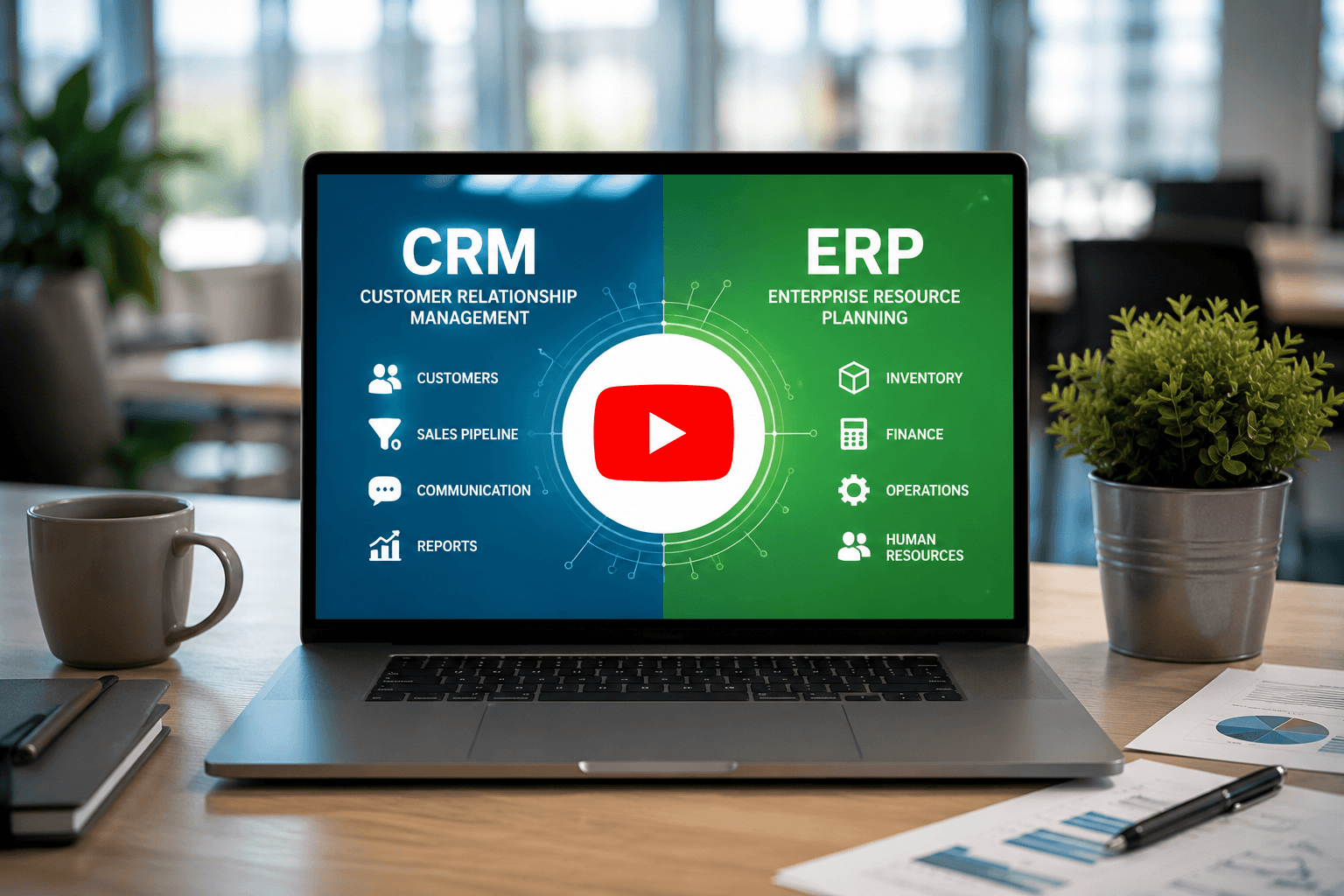
If you prefer a quick visual explanation, watch this video.
- Signs You Need an ERP System
You may need a more structured setup when internal work starts becoming harder to manage than the actual customer demand.
Common signs include unclear task ownership, inconsistent information between teams, weak visibility over resources, and too much time spent checking details manually.
If your team often asks “who is responsible for this?” or “where is the latest version?”, your internal structure may need more clarity.
At this stage, the goal is not to add more tools, but to create a clearer way of working.
This is where FLOWii can help by bringing daily operations, invoicing, task tracking, and team communication into one organized environment.
- Signs You Need a CRM System
You may need a stronger customer management process when opportunities start slipping through the cracks. This usually happens when customer details are scattered across emails, spreadsheets, or someone’s memory.
The solution is to track contacts, conversations, next steps, and open opportunities in one clear process.
Common signs include:
- Missed follow-ups after calls, emails, or meetings
- Scattered customer notes across different tools
- Unclear deal stages with no reliable sales overview
- Lost communication history when someone is unavailable
- Slow responses because information is hard to find
- Weak handovers between sales, support, and delivery
Why Do Growing Companies Often Need Both?
Growth creates a new problem: winning more customers is not enough if your internal work cannot keep up.
Every new deal brings follow-up work, from planning and task assignment to support, delivery, and reporting. If these steps are disconnected, your team may sell well but struggle to deliver consistently.
That is why growing companies often need both sides working together: one for relationships and opportunities, the other for organized execution and clear ownership.
Good to know: With FLOWii, you can connect customer management with daily execution, so your team can move from opportunity to delivery with clearer ownership, fewer handovers, and less chaos.
CRM and ERP Implementation: How to Set It Up Properly
Implementation means setting up your tools, workflows, and information flow so both customer management and internal work are supported from the start.
What Is CRM Implementation?
CRM implementation involves setting up your sales process, customer records, and communication rules, so your team can manage relationships in a structured way.
It includes organizing contacts, defining your pipeline, and aligning how your team tracks deals and interactions. It also requires cleaning and migrating existing information to ensure accuracy from the start.
To be effective, your team needs clear guidelines and usage habits for consistent daily work.
What Is ERP Implementation?
Setting up this type of platform means defining responsibilities, information flow, and daily workflows, so work runs consistently across the company.
It includes configuring how resources, tasks, and internal activities are managed and aligned between teams.
To be effective, your team needs clear process definitions and usage rules to keep work organized and efficient.
Tip: Implementing a cloud-based CRM and ERP solution does not have to be costly. FLOWii starts at just €11 per user/month, making it accessible for small and medium-sized teams.
How Do ERP and CRM Work Together?
When aligned, these platforms create a continuous flow of information between your internal work and customer-facing activities.
Instead of using separate tools, updates are shared automatically, so your team always has the same up-to-date information.
| Process Stage | Customer Management Role | Operational Role |
| Lead management | Tracks leads and customer interactions | Creates customer records for future workflows |
| Sales process | Manages deals, communication, and pipeline | Provides pricing and availability data |
| Order handling | Transfers confirmed deals | Manages orders and fulfillment |
| Delivery | Keeps customers informed | Manages operations and resource allocation |
| After-sales | Maintains relationships and follow-ups | Handles billing and internal tracking |
By linking these areas, companies can respond faster, reduce errors, and keep teams aligned.
In practice, this matters, as studies show that CRM adoption can increase customer retention by 25–40% and sales by up to 30%, highlighting the value of shared information and coordinated work.
ERP and CRM Examples in Real Life
The easiest way to understand ERP and CRM examples is to look at how they work in everyday situations. Definitions are useful, but real scenarios show where each one creates value.
Example 1: Service Company
A service company often needs to handle inquiries, schedule work, assign technicians, track attendance, and keep customers informed.
Customer management helps the team follow requests, communication history, and open opportunities. The operational side supports planning, task assignment, availability, billing records, and service delivery.
Together, both parts help the company move from request to completed work with fewer delays and clearer ownership.
Example 2: Marketing or Creative Agency
For an agency, the first challenge is usually managing leads, client communication, proposals, and approvals.
Once the project starts, the focus shifts to deadlines, internal tasks, team capacity, reporting, and client updates. Without a coordinated setup, important details can easily get lost between sales, account management, and delivery.
In this case, customer-facing tools help win and manage clients, while operational tools keep projects moving on time.
Example 3: Small Retail or Distribution Company
A small retailer or distributor needs a clear view of customers, orders, stock, and restocking needs. The customer side supports repeat buyers and sales opportunities, while the operational side manages purchasing, delivery status, and stock levels.
For larger teams, warehouse software helps track goods and availability, while an attendance system supports planning for warehouse staff, drivers, or shift-based teams.
Together, these areas help the company avoid stock issues, plan capacity, and serve customers more reliably. You can explore real examples of CRM and ERP implementation in one company in our case studies.

CRM ERP Integration: How It Actually Works in Practice
If you’ve ever copied information between tools or searched for the latest version, you already know why integration matters. Disconnected tools create duplicate records, delays, and inconsistent information.
A connected setup creates a single source of truth, helping your team make faster decisions with fewer mistakes.
What Data Should Be Connected?
Start with the information your team uses every day: contacts, deals, invoices, tasks, projects, orders, and communication history.
When these records are linked, you can move from first contact to delivery without copying details manually or losing context between teams. The goal is not to connect everything at once, but to link the information that removes the most friction from your daily work.
A good starting point is any data your team updates repeatedly or needs to find quickly during sales, delivery, or support.
How Does CRM ERP Integration Work?
CRM-ERP integration lets information move automatically between customer-facing work and internal workflows. For example, a won deal can trigger an invoice, assign tasks, update customer details, or prepare delivery.
This typically works through API connections, built-in integrations, or automation tools.
For more complex workflows, a custom software development company can build tailored integrations when standard connectors do not support the required data flow between CRM, ERP, and other business systems.
The result is less manual updating and more time spent serving customers.
What Problems Does Integration Solve?
Integration solves problems created by separate tools and disconnected information. It reduces manual copying, duplicate records, and errors caused by outdated details.
It also improves handovers, because sales, operations, and support can work with the same context from first contact to final delivery.
For growing companies, this means clearer reporting, better accountability, and faster work without losing control.
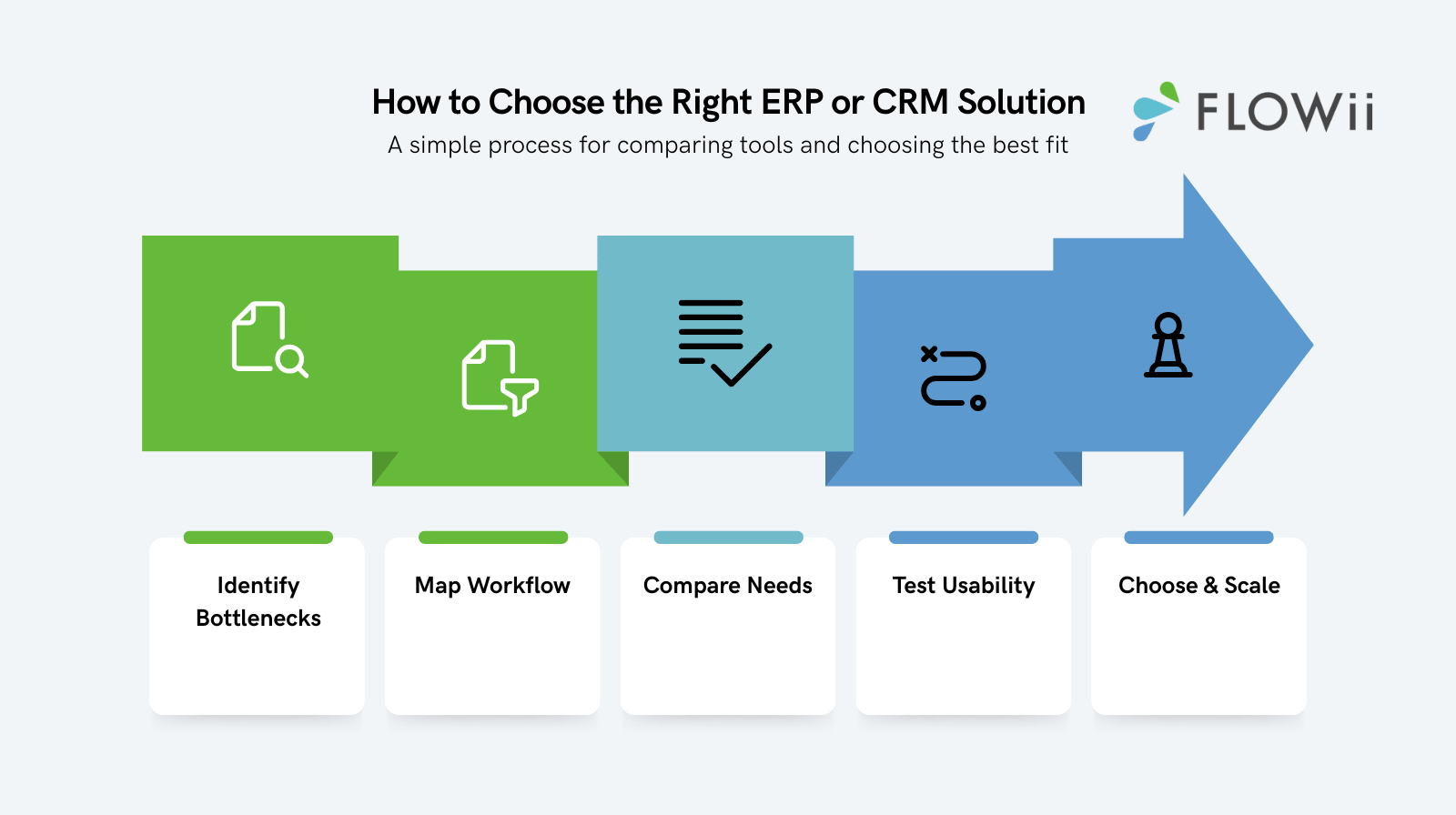
How Do You Choose the Right ERP or CRM Solution?
Choosing the right ERP or CRM solution is easier when you focus on real problems, not just feature lists. The goal is to find a tool that fits your daily workflow, supports your team, and can grow with your company.
| Step | What to Check | Why It Matters |
| 1. Biggest bottleneck | Follow-ups, ownership, information, reporting | Shows what to solve first |
| 2. Workflow | From lead to delivery | Reveals delays and gaps |
| 3. Connected data | Contacts, tasks, projects, invoices, reports | Keeps key information aligned |
| 4. Ease of use | Daily team adoption | Prevents people returning to spreadsheets |
| 5. Scalability | More users, features, and processes | Supports growth without rebuilding |
Tip: With FLOWii, you can test an all-in-one approach with a 30-day free trial, starting from €11 per user/month.
Common ERP and CRM Mistakes to Avoid
Choosing the right tool is only one part of the decision. The bigger challenge is avoiding mistakes that make the setup harder, more expensive, or less useful for your team.
- Choosing too many features too early
A complex setup can slow your team down instead of helping them. Start with the features that solve your biggest daily problems first. - Ignoring team adoption
Even the best platform fails if people do not use it consistently. - Keeping messy information
Duplicate contacts, outdated records, and unclear ownership create confusion from day one. - Not defining responsibilities
Every important workflow needs a clear owner. - Buying disconnected tools
Separate tools may look cheaper at first, but they often create more manual work later.
Final Thoughts
As your company grows, so do your tools, information, and daily responsibilities. The right setup helps you align key activities, reduce friction, and keep both customer management and internal work under control.
Try it with a 30-day free trial and see whether a more connected way of working fits your team before making a long-term commitment.
FAQ
1. What is the main difference between ERP and CRM?
ERP focuses on internal control, such as resources, workflows, reporting, and financial visibility.
CRM focuses on customer-facing work, including leads, communication, follow-ups, and sales opportunities.
In simple terms, one helps manage how the company runs, while the other helps build and maintain customer relationships. The real difference is not only in features, but in the type of problem each tool solves.
As many business consultants explain, companies should not choose based on software categories, but based on whether they need better internal structure or stronger customer management first.
2. Do small businesses need ERP or CRM first?
Most small businesses start with customer management when they struggle with missed follow-ups, scattered contacts, or unclear sales activity.
A more operational setup becomes important when the challenge shifts to team coordination, reporting, ownership, or resource planning.
For many teams, a small business CRM is the first step before internal work becomes more complex.
3. Can ERP and CRM work together?
Yes. When both tools are aligned, information can move smoothly from sales to delivery, support, and reporting.
For example:
- A won deal can automatically create delivery tasks
- Contact details can stay consistent across teams
- Order or billing details can give sales better context
- Support teams can understand what was promised before the handover
This helps reduce manual updates, avoid missing information, and create a cleaner flow from first contact to final delivery.
4. What should a good CRM experience include?
A good CRM experience should make daily work easier, not more complicated. It should help your team quickly find customer history, communication records, next steps, and deal context without searching across multiple tools.
For customers, this means faster responses, fewer repeated questions, and more consistent service.
5. What is the biggest mistake when choosing between ERP and CRM?
The biggest mistake is choosing based on features instead of the actual problem.
| If your main problem is... | You likely need... |
| Messy sales communication | A customer-focused tool |
| Missed follow-ups | Better lead and relationship tracking |
| Unclear internal work | Stronger operational control |
| Poor task ownership | A more structured internal setup |
| Disconnected teams | A solution that keeps work and information aligned |
6. Can a CRM Replace an ERP?
In most cases, no. A CRM helps with leads, communication, follow-ups, and customer relationships.
But if you need to manage resources, stock, procurement, reporting, or internal coordination, it will not be enough on its own.
If your team wins customers but struggles to deliver consistently, you likely need stronger structure behind the scenes.
Worth considering: A connected platform helps you manage customers and internal work in one clear environment, without constantly switching between separate tools.
7. How long does CRM or ERP implementation take?
Implementation time depends on company size, data quality, number of users, integrations, and customization.
For most small teams, a basic CRM implementation can take a few weeks to 1–3 months, while larger or more complex CRM projects may take 6–12 months. ERP projects usually take longer because they affect more areas of the company, and even smaller ERP rollouts can take several months, while large enterprise projects may take a year or more.
A realistic range looks like this:
| Implementation type | Typical timeline |
|---|---|
| Simple cloud CRM | 1–4 weeks |
| Small business CRM | 1–3 months |
| CRM with integrations/customization | 3–6+ months |
| Small ERP rollout | 3–6 months |
| Mid-sized ERP implementation | 6–12 months |
| Large ERP project | 12+ months |
The fastest projects usually have clean customer records, clear workflows, limited customization, and strong team ownership. The slowest ones usually fail because the company starts implementation before cleaning data, defining responsibilities, or agreeing how daily work should actually run.